At a glance
- Mbps means megabits per second; divide by 8 for MB per second.
- Separate actual recording examples from the calculation-only 1,740Mbps row.
- Allow for card write requirements, editing files, and backups.
Use recording settings to consider card capacity and recording time

Video recording settings may display numbers such as 100M and 600M. These indicate bitrate: a guide to the amount of data stored in 1 second. For example, 100Mbps means 100 megabits per 1 second. For the same recording duration, a higher bitrate uses more storage. Here I compare capacity to consider how many minutes fit on a card and whether there will be enough storage after getting home.
Data amounts use units called bits and bytes. 8bit equals 1byte. The lowercase b in Mbps means bits, while the uppercase B in MB means bytes, so 100Mbps is not 100MB per second. Dividing 100Mbps by 8 gives approximately 12.5MB per second.
The table below gives examples of storage calculations. 1,740Mbps is not an α1 recording-setting value. Bitrate alone does not determine resolution, as shown by the 4K and Full HD examples that both use 100Mbps. The approximately 170Mbps row is an example from the Canon EOS R7, not the α1.
This table scrolls horizontally. Swipe left or right, or focus the table and use the Left Arrow, Right Arrow, Home, and End keys to move through it.
| Bitrate | Actual manufacturer-published setting, or value used only for calculation | Data per 1 second | Recording for 1 minute | Recording for 1 hour |
|---|---|---|---|---|
| 100Mbps | Sony α1: 4K UHD 29.97p, XAVC S / H.264, Long GOP, 4:2:0 8bit. Or Full HD 119.88p, XAVC S HD, Long GOP, 4:2:0 8bit | Approx. 12.5MB | Approx. 0.75GB | Approx. 45GB |
| Approx. 170Mbps | Canon EOS R7: 4K UHD 29.97p, Canon Log 3 on, H.265, IPB (Standard), 4:2:2 10bit | Approx. 21.25MB | Approx. 1.275GB | Approx. 76.5GB |
| 600Mbps | Sony α1:4K UHD 59.94p、XAVC S-I/H.264、Intra、4:2:2 10bit | Approx. 75MB | Approx. 4.5GB | Approx. 270GB |
| 1,740Mbps | Example for calculating storage only. Not an α1 recording setting | Approx. 217.5MB | Approx. 13.05GB | Approx. 783GB |
The table's storage figures are estimates obtained by dividing bitrate by 8 to convert it to bytes, then multiplying by the number of recording seconds. Canon publishes a file size of approximately 1,218MB per minute for the EOS R7's approximately 170Mbps setting. Treat that separately from the approximately 1,275MB per minute calculated here using a constant 170Mbps.
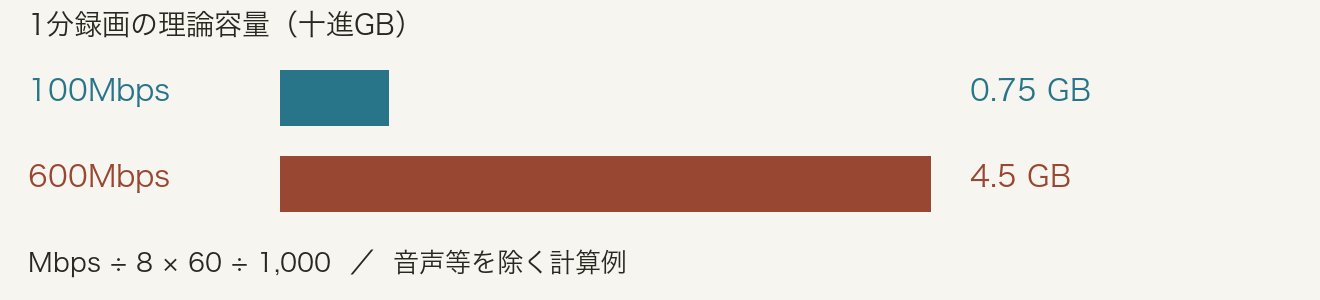
Reading the diagram in English
- Theoretical size of a one-minute recording
- The chart uses decimal GB and assumes a constant bitrate.
- Blue bar — 100 Mbps
- 0.75 GB for one minute.
- Rust bar — 600 Mbps
- 4.5 GB for one minute.
- Calculation
- Mbps ÷ 8 × 60 ÷ 1,000 = decimal GB per minute. This example excludes audio and other overhead.
Actual amounts may differ from the table because VBR (variable bitrate) changes the data rate according to the picture content, and audio and other data also take space. Check the remaining recording time shown by the camera too. Even a high-capacity card may not record if its write speed is insufficient. Check the manufacturer's card requirements for your recording settings.
Editing files and backups also use storage. 1TB of original data plus 2 copies takes 3TB in total. A small file can also be demanding to edit on a computer if decoding it is complex. Check not only whether it fits on the card, but whether you can get all the way through to export on your own computer.
For a direct calculation in decimal GB, one minute is Mbps × 7.5 ÷ 1,000 and one hour is Mbps × 450 ÷ 1,000. A higher bitrate alone does not establish higher image quality; compression and shooting conditions matter too.
References
Sony / α1 video recording settings and bitrate (opens in a new tab)
Sony / α1 compression formats and computer compatibility (opens in a new tab)
Sony / α1 video settings (original guide) (opens in a new tab)
Checklist for this article
Use the checks as a working note while this page is open.